

Send Lightning Payment
Send Bitcoin Lightning Network payments in USD or BTC from a customer account on the Cybrid platform.
Availability
Production accessTo enable Lightning Network in production, contact the partner success team.
Overview
The Cybrid platform supports sending Lightning Network payments in USD or BTC.
Sending payments requires an invoice_operations pre-fund account. This bank-level account holds a balance with Cybrid's Lightning Network provider, enabling instant payment of Lightning invoices. Invoice operations accounts can hold USD or BTC.
Customer payments are made from the invoice operations pre-fund account. When a payment occurs, the payment amount is also book-transferred from the customer's fiat account (for USD) or trading account (for BTC) to the bank's corresponding account. Both the invoice operations account and the customer's account must have sufficient balance to cover the payment amount including network fees.
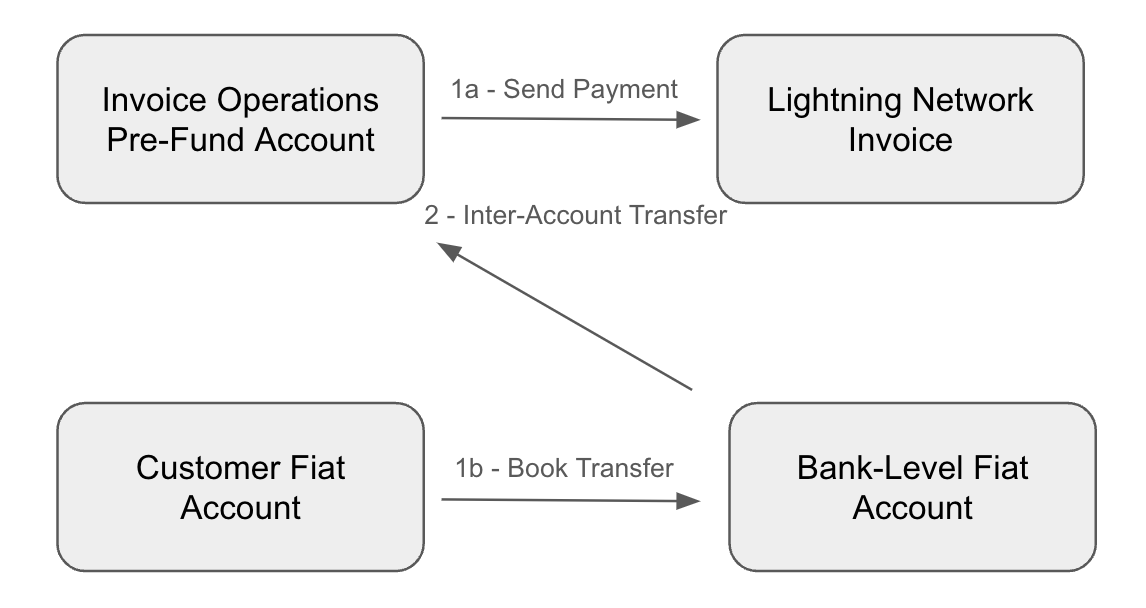
Terminology:
- Payer — the Cybrid partner's customer sending payment.
- Payee — the payer's end-merchant receiving payment.
Steps to send a Lightning Network payment:
- Create bank-level fiat or trading accounts.
- Create and fund a customer-level account.
- Create an invoice operations pre-fund account.
- Fund the invoice operations account via inter-account transfer.
- Create a Lightning Network payment transfer.
- Top up the invoice operations account as needed.
1. Create bank-level accounts
If not already created, set up a bank-level fiat account (for USD) or trading account (for BTC). This is a one-time operation.
See Platform Accounts.
2. Create and fund the customer-level account
Create a customer-level fiat or trading account (one-time), then fund it (ongoing).
See Creating Platform Accounts and Transfer Process.
3. Create an invoice operations pre-fund account
Create the invoice operations account at the bank level (one-time) via POST /api/accounts:
{
  "type": "invoice_operations",
  "asset": "USD",
  "name": "<insert account descriptive name>"
}
{
"created_at": "<created_at timestamp>",
"updated_at": "<updated_at timestamp>",
"type": "invoice_operations",
"guid": "<created account GUID>",
"asset": "USD",
"name": "<inserted account descriptive name>",
"bank_guid": "<associated bank_guid>",
"platform_balance": 0,
"platform_available": 0,
"state": "storing",
"labels": null
}The account begins in state: "storing" and progresses to state: "created" (terminal state).
4. Fund the invoice operations account
Fund the invoice operations account so customers can send payments. This is an ongoing operation.
Account for network feesWhen funding the invoice operations account, include enough balance to cover potential network fees.
Create a quote via POST /api/quotes:
{
  "product_type": "inter_account",
  "asset": "USD",
  "deliver_amount": 10000
}
{
"created_at": "<created_at timestamp>",
"updated_at": "<updated_at timestamp>",
"guid": "<created quote_guid>",
"product_type": "inter_account",
"bank_guid": "<associated bank_guid>",
"asset": "USD",
"side": "deposit",
"receive_amount": 10000,
"deliver_amount": 10000,
"fee": 0,
"issued_at": "<issued_at timestamp>",
"expires_at": "<expires_at timestamp>"
}Create the inter-account transfer via POST /api/transfers:
{
  "transfer_type": "inter_account",
  "quote_guid": "<insert quote_guid>",
  "source_account_guid": "<insert bank-level fiat or trading account_guid>",
  "destination_account_guid": "<insert invoice operations account_guid>"
}
{
"created_at": "<created_at timestamp>",
"updated_at": "<updated_at timestamp>",
"guid": "<created transfer_guid>",
"transfer_type": "inter_account",
"bank_guid": "<associated bank_guid>",
"quote_guid": "<inserted quote_guid>",
"external_bank_account_guid": null,
"asset": "USD",
"side": "deposit",
"state": "storing",
"failure_code": null,
"amount": 10000,
"estimated_amount": 10000,
"fee": 0,
"source_account": {
"type": "fiat",
"guid": "<inserted bank-level fiat account_guid>",
"bank_guid": "<associated bank_guid>"
},
"source_participants": null,
"destination_account": {
"type": "invoice_operations",
"guid": "<insert invoice operations account_guid>",
"bank_guid": "<associated bank_guid>"
},
"destination_participants": null,
"labels": null
}Poll GET /api/transfers/{transfer_guid} until state: "completed". Then verify the platform_available balance on the invoice operations account via GET /api/accounts/{account_guid}.
5. Create a Lightning Network payment transfer
Once the invoice operations account is funded, customers can pay Lightning Network invoices. See the Receive Lightning Payment guide for creating invoices.
For a customer with state: "verified" and a fiat or trading account, create a lightning_transfer quote via POST /api/quotes:
{
  "product_type": "lightning_transfer",
  "customer_guid": "<insert customer_guid>",
  "network_address": "<insert network_address>",
  "asset": "USD"
}
{
"created_at": "<created_at timestamp>",
"updated_at": "<updated_at timestamp>",
"guid": "<created quote_guid>",
"product_type": "lightning_transfer",
"customer_guid": "<inserted customer_guid>",
"asset": "USD",
"side": "withdrawal",
"receive_amount": 100,
"deliver_amount": 100,
"fee": 0,
"issued_at": "<issued_at timestamp>",
"expires_at": "<expires_at timestamp>",
"network_fee_asset": "USD",
"network_address": "<inserted network_address>"
}
Sandbox behaviorIn sandbox banks, the
receive_amountis randomly generated. Since Lightning Network channels are not created in sandbox, thenetwork_addresscan be any string value.
Create the lightning transfer via POST /api/transfers:
{
  "transfer_type": "lightning",
  "customer_guid": "<inserted customer_guid>",
  "quote_guid": "<inserted quote_guid>",
  "network_fee_account_guid": "<inserted network_fee_account_guid>"
}
{
"created_at": "<created_at timestamp>",
"updated_at": "<updated_at timestamp>",
"guid": "<created transfer_guid>",
"transfer_type": "lightning",
"customer_guid": "<inserted customer_guid>",
"quote_guid": "<inserted quote_guid>",
"external_bank_account_guid": null,
"asset": "USD",
"side": "withdrawal",
"state": "storing",
"failure_code": null,
"amount": 100,
"estimated_amount": 100,
"fee": 0,
"source_account": {
"type": "fiat",
"guid": "<inserted account_guid>",
"customer_guid": "<inserted customer_guid>"
},
"source_participants": null,
"destination_account": null,
"destination_participants": null,
"labels": null
}
Network fee assignmentThe
network_fee_account_guidcontrols who pays network fees. Use a bank-level account GUID for the partner to cover fees, or a customer-level account GUID for the customer to cover fees.
Poll GET /api/transfers/{transfer_guid} until state: "completed", then verify:
- Invoice operations account —
platform_availabledebited by transfer + network fee amounts. - Customer fiat account —
platform_availabledebited by the transfer amount (and network fees if the customer's account was chosen to cover them). - Bank-level fiat account —
platform_availablecredited by the transfer amount.
6. Top up the invoice operations account
Repeat step 4 to top up the invoice operations account as needed.
Updated about 2 months ago