

Transfer Process
How do transfers work on the Cybrid Platform?
Overview
Cybrid moves funds in and out of customer accounts through the transfers endpoints. Transfers work for both fiat (USD, CAD) and crypto (USDC and stablecoin variants), across multiple payment rails.
Funding methods
Fund a customer's fiat account via one of:
| Method | Rails | Currencies | Guide |
|---|---|---|---|
| Plaid-connected bank account | ACH, EFT | USD, CAD | Plaid funding |
| Deposit bank account | Wire, ACH push, RTP, FedNow | USD | Deposit bank account funding |
| Instant funding | ACH, RTP, FedNow | USD | Instant funding |
| Book transfer | Internal ledger | USD, USDC | Book transfers |
| Interac E-Transfer | etransfer | CAD | Interac E-Transfer |
Withdrawal methods
| Method | Rails | Currencies | Guide |
|---|---|---|---|
| Withdraw crypto | On-chain | USDC, ETH | Withdraw crypto |
| Plaid withdrawal | ACH, EFT | USD, CAD | Plaid funding |
| Interac E-Transfer | etransfer | CAD | Interac E-Transfer |
Transfer types
| Type | Description |
|---|---|
funding | Fiat deposits and withdrawals through external bank rails (ACH, EFT, RTP, FedNow, etransfer). |
instant_funding | Fiat deposits that credit the customer's fiat account immediately while the external bank transfer settles. See Instant funding. |
book | Internal transfers between accounts on the platform. Used with the pre-funded account model. See Book transfers. |
crypto | Crypto withdrawals to pre-registered external wallets. Crypto deposits are not initiated from Cybrid; transfers are created to record incoming on-chain deposits. |
inter_account | Transfers between two accounts owned by the same entity (e.g., trading → storage). |
Specify a fiat account
By default, a customer or bank has one fiat account per asset, so the platform resolves the account to debit or credit automatically. A bank can be configured — a non-default setup that requires Cybrid Support to enable — to allow more than one fiat account per asset for its customers or for the bank itself. When that configuration is active, you must tell the platform which account to use. See Platform Accounts for how multiple fiat accounts per asset are set up.
If you omit the account identifier when more than one fiat account exists for the asset, the request fails:
{
  "status": 422,
  "error_message": "Multiple accounts found",
  "message_code": "invalid_fiat_account"
}
Which field to specify
The field depends on the transfer type:
| Transfer type | Field |
|---|---|
funding | fiat_account_guid |
instant_funding | bank_fiat_account_guid (when the bank has multiple) and customer_fiat_account_guid (when the customer has multiple) |
For funding transfers, set fiat_account_guid on POST /api/transfers:
{
  "quote_guid": "quote_guid",
  "transfer_type": "funding",
  "external_bank_account_guid": "external_bank_account_guid",
  "fiat_account_guid": "fiat_account_guid",
  "source_participants": [
    {
      "type": "customer",
      "guid": "customer_guid",
      "amount": 10000
    }
  ],
  "destination_participants": [
    {
      "type": "customer",
      "guid": "customer_guid",
      "amount": 10000
    }
  ]
}
For instant_funding transfers, use the two separate fields — bank_fiat_account_guid for the bank's account and customer_fiat_account_guid for the customer's:
{
  "quote_guid": "quote_guid",
  "transfer_type": "instant_funding",
  "external_bank_account_guid": "external_bank_account_guid",
  "bank_fiat_account_guid": "bank_fiat_account_guid",
  "customer_fiat_account_guid": "customer_fiat_account_guid",
  "source_participants": [
    {
      "type": "customer",
      "guid": "customer_guid",
      "amount": 10000
    }
  ],
  "destination_participants": [
    {
      "type": "customer",
      "guid": "customer_guid",
      "amount": 10000
    }
  ]
}
Trades follow the same rule: set fiat_account_guid on POST /api/trades when the customer or bank has multiple fiat accounts for the asset.
Find the fiat account GUID
List fiat accounts and select the one whose asset matches the quote's asset. Scope the request to the customer with customer_guid, or to the bank with owner=bank (for example, GET /api/accounts?owner=bank&type=fiat&include_balances=false):
GET /api/accounts?type=fiat&customer_guid=customer_guid&include_balances=false
Authorization: Bearer YOUR_TOKEN
Each account in the response includes an asset and a guid. Pick the account matching the asset you are transferring and pass its guid in the appropriate field above.
This call needs only asset and guid, so include_balances=false skips the balance lookup and returns a lighter response. See Read Accounts Efficiently.
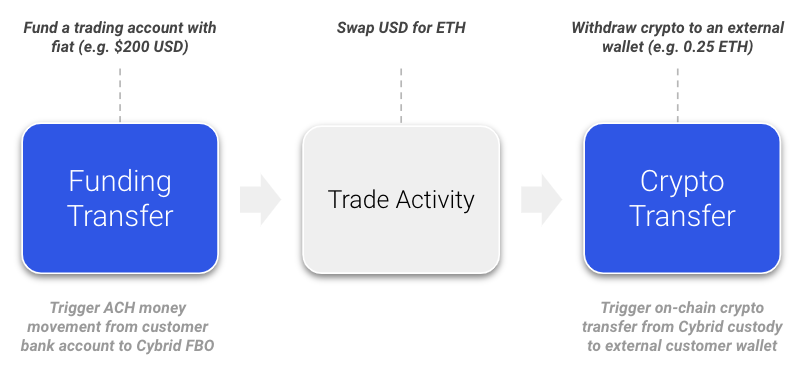
Where transfers fit in
Transfers bookend trading activity on the platform:
Compliance routing requirementFor compliance tracking, transfers from a customer's external bank account to a business or partner (bank)
fiataccount must first be routed through the customer'sfiataccount on Cybrid. Direct transfers from a customer's external bank account to a business/partnerfiataccount are not supported.
Transfer states
After creating a transfer via POST /api/transfers, it typically progresses through the states below. Cancellation follows an alternate path — see Cancelling a transfer.
storing→reviewing— immediate transition after creation.reviewing→pending— the payment processor completes initial processing (typically a few minutes).pending→holding— funding transfers enterholdingwhile the holding period runs (typically two business days for ACH); other rails may skip this state.holding→completedorfailed— the holding period ends and the payment processor finalizes the transfer.
Compliance reviewIf a transfer is flagged for compliance review, it remains in
reviewinguntil the review completes, then transitions directly tocompletedorfailed.
When a transfer reaches failed, the failure_code field contains the reason for failure.
Cancelling a transfer
You can request cancellation of an eligible funding transfer while it is in storing, pending, or reviewing. The transfer moves to the transient cancelling state, then resolves to failed with failure_code: cancelled (cancelled successfully) or completed (the transfer settled before the cancellation took effect). Cancellation is best-effort, and there is no cancelled state. See Cancel a Transfer.
ACH returns
Deeper coverage in Reserve AccountThe Reserve Account guide covers ACH return windows, NACHA return-rate thresholds, and how the reserve balance interacts with
funding_return,loss_coverage, andloss_reclaimtransfers in detail.
ACH transfers may be returned by the customer's bank after processing. How Cybrid handles the return depends on when it occurs relative to the transfer's holding period:
- Within the holding period: If the bank initiates a return while the transfer is still in the
holdingstate, the original transfer transitions tofailed. - After the holding period: If the bank returns a transfer that has already reached
completed, the original transfer's state remainscompleted. Areturn_codeis added to the transfer record, and Cybrid automatically creates a newfunding_returntransfer to reconcile the returned funds. Cybrid does not automatically liquidate customer crypto in response to an ACH return; if assets must be sold to recover a loss, that step must be initiated manually.
To confirm a returned deposit:
- Check the original transfer for a value in the
return_codefield. - Look for a
funding_returntransfer linked to the original transfer ID. - The
funding_returntransfer includes the ACH trace number and return code (e.g.,R03for insufficient funds).
ACH push transactions cannot be reversedACH push (credit) transactions — where funds are sent into a Cybrid account from an external bank — cannot be reversed via an ACH return initiated by the recipient. If a refund is required for an ACH push, collect the recipient's banking details and initiate a new withdrawal to return the funds. Attempting to process a return on an ACH push will be denied by the system.
ACH return codes and troubleshooting
When a funding transfer is returned, the API response may include a return_code field. For ACH transfers, these codes follow the NACHA standard. For example, an R01 return code indicates "Insufficient Funds" in the source bank account.
Common ACH return codes:
| Code | Name | Description |
|---|---|---|
R01 | Insufficient Funds | The available balance is not sufficient to cover the debit entry. |
R02 | Account Closed | A previously active account has been closed by action of the customer or the RDFI. |
R03 | No Account/Unable to Locate Account | The account number structure is valid, but does not correspond to the individual identified in the entry. |
Troubleshooting steps:
- Check the
return_codein the transfer details for the specific reason. - For
R01(Insufficient Funds), verify the balance in the linked external bank account. - For other codes, refer to the NACHA ACH return code documentation or contact support for further assistance.
- Include all required participant information in the API request.
- If the error relates to Plaid or bank connectivity, try reconnecting the bank account.
Canadian funding withdrawals
Canadian (CAD) funding withdrawals are supported on two rails: EFT (eft) and Interac E-Transfer (etransfer). The required quote fields differ between the two rails.
For EFT withdrawals, specify the destination_account_guid (the external bank account GUID) in the quote API request. If this field is omitted, you may receive a 422 error with message_code: no_destination_account. This requirement is specific to certain banking providers and may differ from the US (ACH) flow, where the destination account may not be required at the quote stage. Always ensure the destination account is valid and active.
For Interac E-Transfer withdrawals, specify payment_rail: etransfer on the quote. The destination_account_guid field is not used — the recipient is resolved at transfer time using the customer's email or phone on their identity record. See the Interac E-Transfer guide for the full flow.
Transfer limits and failure reasons
All transfers are subject to transaction limits that may vary by payment rail. For example, the default ACH rail may have a per-transfer limit (e.g., $6,000). Transfers above this limit fail. To resolve, either:
- Break the transfer into smaller amounts within the limit (e.g., three transfers of $6,000, $6,000, and $3,000 for a $15,000 total), or
- Use a different payment rail such as wire by setting
"payment_rail": "wire"in your request.
Other common failure reasons include insufficient funds or exceeding a customer's transaction limits. Check a customer's current limits and transaction history using the Get Customer and List Transfers endpoints.
Transfer settlement
Fiat transfer settlement timelines depend on the rail (ACH, RTP/FedNow, EFT, wire). See Fiat Transfer Settlement for cutoff times and batch windows. Book transfers settle instantly on the Cybrid virtual ledger — see Book Transfer Settlement.
Access transaction data
Cybrid does not provide downloadable bank statements via the dashboard or API. Use these endpoints for transaction-level data:
GET /api/transfers— transfer data, filterable byaccount_guid,customer_guid,state,side, and other parametersGET /api/trades— trade activity
Webhooks are available for real-time monitoring. Contact support for additional reporting assistance.
Updated 6 days ago