

API Keys
Generate and manage API key pairs for secure access to the Cybrid platform.
Set up your Organization and Bank
Before interacting with the Cybrid API, create an Organization and Bank through the dashboard.
After logging in, you are guided through three steps:
- Name your Organization — this represents your business or project within the Cybrid platform.
- Create a Bank — a Bank is a digital representation of a financial institution in the Cybrid ecosystem. Enter a descriptive name and configure your Bank settings.
- Generate an API key pair — click Generate to create a Client ID and Client Secret for secure API communication. Add an IP allowlist on this step to restrict the credentials to specific source IPs; this is required for live partners and for newly created keys.
Store your Client Secret
Once generated, the Client ID and Client Secret display on screen. Hover over the Client Secret to reveal it, and use the copy buttons on the right to copy each value.
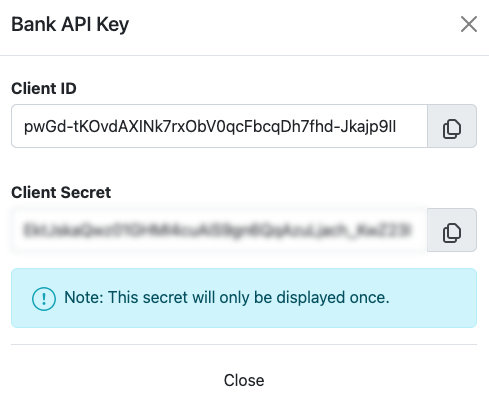
Save your Client Secret immediatelyThe secret displays only once. If you navigate away without saving it, you must generate a new key pair.
Generate new keys
To generate new keys at any time:
- Navigate to the Developers tab in the Cybrid dashboard.
- Click Generate New Key in the top-right corner.
- Select either Organization keys or Bank keys.
- Add an IP allowlist to restrict the new credentials to specific source IPs; this is required for live partners and for newly created keys.
This lets you rotate credentials or manage keys across multiple projects. After you confirm the new key is working, remove the old key pair from the Developers tab so it can no longer be used.
Bank-specific API credentials
When managing multiple banks under a single organization, each bank requires its own API credentials (client_id and client_secret). The access token generated from these credentials is scoped to a specific bank — all API actions (such as creating customers) run under that bank. The bank_guid parameter in API requests is ignored; the access token determines bank context.
To generate credentials for a specific bank:
- In the Cybrid portal, use the top-left selector to choose the bank you want to generate credentials for.
- Navigate to the Developers tab.
- Generate new credentials for that bank.
This ensures API requests are scoped to the intended bank.
Restrict access with an IP allowlist
Each Bank or Organization Application can carry an optional IP allowlist — a list of public IPv4 addresses or CIDR ranges that are permitted to use the credentials. Requests from any other source IP are rejected. An empty allowlist means unrestricted access (the default).
Limits and accepted values
- Up to 3 entries per Application.
- IPv4 only. IPv6 addresses are rejected at validation.
- Format: a single address (e.g.
203.0.113.5) or a CIDR range (e.g.198.51.100.0/24). The example values shown are RFC 5737 documentation-range placeholders and will be rejected at validation — substitute the real public addresses from your environment. - Must be a public address. Private (RFC 1918), loopback, link-local, multicast, reserved, CGNAT, documentation (RFC 5737), and benchmarking ranges are rejected at validation.
Where to configure it
- Onboarding wizard — the Generate an API key pair step on first login.
- Generate Bank Key form — on the Developers tab when creating a new Application.
- Edit Application form — on the Developers tab to update an existing Application.
The Developers tab also lists each Bank Application's current entries in an IP Allowlist column.
When changes take effect
The allowlist is embedded in the access token at issuance and enforced on every API call. Edits apply on the next token issuance — access tokens already in flight continue to enforce the list they were issued with. After updating an allowlist, request a fresh token before retrying from a new IP.
Validate in a non-production Application firstPinning to the wrong egress IP can lock your integration out of the Cybrid API. Confirm the source IP from your production environment before applying the allowlist there.
Clear the allowlist
To remove all restrictions, delete every entry in the Edit Application form. Via the API, send an empty array on PATCH /api/bank_applications/{client_id} or PATCH /api/organization_applications/{client_id}:
PATCH /api/bank_applications/{client_id}
Content-Type: application/json
Authorization: Bearer YOUR_TOKEN

{"ip_allowlist": []}
{"client_id": "client_id", "name": "Production Bank Key", "ip_allowlist": []}Omit the ip_allowlist field on PATCH to leave the existing list unchanged. See PATCH /api/bank_applications/{client_id} for the full schema.
Denied request behavior
When a request arrives from a source IP that is not in the Application's allowlist, the Cybrid API returns:
{"error": "forbidden", "message_code": "ip_not_allowed", "message": "IP address not in allowlist"}The HTTP status is 403 Forbidden. The message_code is ip_not_allowed. Map this in your error handling to distinguish it from scope or rate-limit errors.
Scope
IP allowlists apply to Bank and Organization Applications. Customer tokens generated via POST /api/customer_tokens are not gated by the Application allowlist.
Handle "Signature has expired" errors
If you receive a Signature has expired error with status 401 (authentication_failed), your access token has expired. To resolve this, generate a new token using your existing API credentials.
You do not need to recycle or rotate your API key or Client Secret for this error. Rotating secrets is only necessary if you suspect they have been compromised or as part of periodic security hygiene — not for normal token expiration.
Updated 5 days ago