

US B2B Payments Integration Guide
How do I move USD into stablecoin and pay out over on-chain, remittance, and 3rd-party domestic payout methods as a US business?
This guide describes how a US business moves fiat into stablecoin and disburses it over multiple payout methods on the Cybrid platform. A business funds a USD balance, Cybrid converts it to a stablecoin, and the business pays a supplier, vendor, or recipient over the payout method that fits the payment — on-chain, cross-border, or domestic fiat.
In detail, a business customer funds a USD fiat account by pushing funds (Wire, RTP, or ACH push) into its Cybrid deposit bank account, converts USD to a stablecoin (USDC/USDT) in a trading account, then pays out over one or more payout methods:
- a Cybrid-integrated remittance plan to a recipient's foreign bank account,
- an on-chain transfer to a 3rd-party external wallet, or
- a 3rd-party domestic payment (Wire, RTP, or ACH push) to a 3rd-party US bank account.
Business customers are onboarded via KYB, and recipients are tracked as verified counterparties. The three payout methods are alternatives — implement the ones your integration uses.
At a high level, you will:
- Onboard and verify the business customer with KYB.
- Create the USD fiat account, a stablecoin trading account, and the customer's deposit bank account.
- Fund the USD account by push (Wire, RTP, or ACH push).
- Convert USD to a stablecoin.
- Pay out over one or more of the remittance-plan, on-chain, and 3rd-party domestic payout methods.
Ready for production?Once you have built and tested this integration in sandbox, the Production Access Checklist covers what it takes to qualify for production access and go live.
Flow of funds
Figure: US B2B on-ramp flow of funds.
Funds move left to right across the Cybrid boundary. The business pushes USD (Wire, RTP, or ACH push) from its external bank account into its Cybrid deposit bank account and USD fiat account, where KYB is held. A trade settles the USD into a stablecoin (USDC/USDT) trading account. From there, payout branches to one of three payout methods: a remittance plan to a recipient's foreign bank account, an on-chain transfer to a 3rd-party external wallet, or a 3rd-party domestic payment to a 3rd-party US bank account. Each recipient is tracked as a verified counterparty.
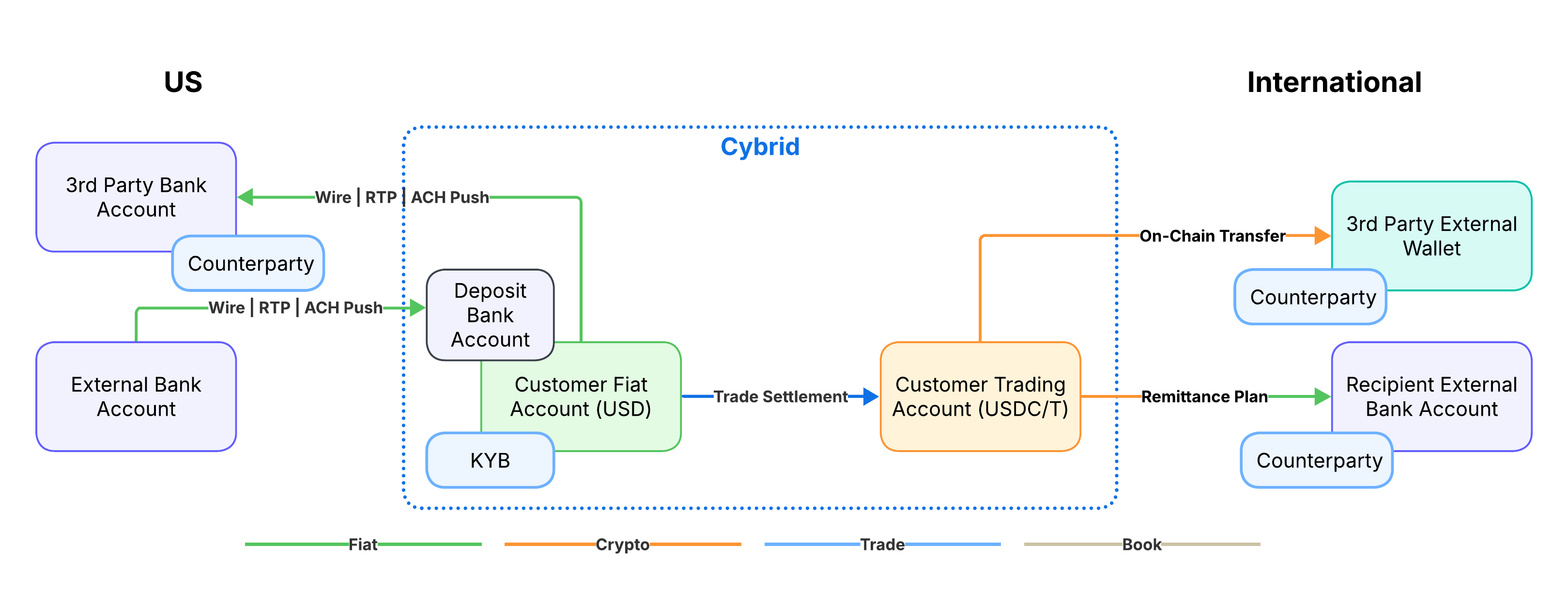
Arrow colors in the diagram: green is fiat movement, orange is crypto movement, blue is trade settlement, and tan is a book transfer.
Table of Contents
- Prerequisites
- Customer onboarding
- Create accounts
- Create deposit bank account
- Fund the USD account via push
- Convert USD to stablecoin
- Pay out via remittance plan
- Pay out via on-chain transfer
- Pay out via 3rd-party domestic payment
- Webhooks
- Additional resources
1. Prerequisites
Before integrating the US B2B Payments flow, configure your sandbox bank with the required features.
Bank configuration
When creating your bank in the sandbox environment, configure these settings:
Customer Type Support:
Enable customer types based on your integration needs:
- Business customers (
business_customers)
Fiat Account Assets:
Enable the fiat currency for the on-ramping country:
- USD
Trading Symbols:
Enable the trading pairs your integration converts on:
USDC-USD(examples in this guide use USDC)USDT-USDUSDC_SOL-USD(required for the remittance-plan payout method)
Crypto Transfers:
Enable crypto transfers (on-chain withdrawals) if you use the on-chain transfer payout method.
Remittance Payout Symbols:
For the remittance-plan payout method, contact Cybrid support to enable the payout symbols for the corridors you require (for example, INR-USDC_SOL). Confirm bank support via supported_payout_symbols before going live. This is the only enablement step for Cybrid-integrated payouts.
Supported corridors for B2B payoutsThis guide's remittance-plan payout method delivers business-to-business (B2B) payouts. Not every corridor supports B2B, and some require extra fields or documents (for example, India B2B requires an invoice with a reference number). For the corridors that support B2B and their per-corridor requirements, see Supported Corridors.
2. Customer onboarding
Create the business customer, then verify its identity through KYB using the Persona SDK.
2a. Create the customer
Create a business customer. Do not provide the customer's name at creation — Persona collects it during KYB, and the legal name returned by Persona becomes the customer's name on file.
Endpoint: POST /api/customers Reference: Create Customer
PII Fields Optional At CreationNot all fields are required to create a customer. Email and phone help identify customers beyond the customer_guid. Do not provide the customer's name at creation — Persona collects it during KYC and the legal name returned by Persona becomes the customer's name on file. This Persona-captured name is also used downstream for bank account ownership verification.
POST /api/customers
Content-Type: application/json
Authorization: Bearer YOUR_TOKEN

{
  "type": "business"
}
{
"guid": "customer_guid",
"bank_guid": "bank_guid",
"type": "business",
"state": "storing",
"created_at": "2026-07-19T15:00:00Z",
"updated_at": "2026-07-19T15:00:00Z"
}Customer states
| State | Description |
|---|---|
storing | Platform is storing customer details |
unverified | Customer created, awaiting identity verification |
verified | Customer identity verified |
rejected | Customer verification rejected |
frozen | Customer account frozen |
Poll GET /api/customers/{customer_guid} until state transitions to unverified.
Polling IntervalUse exponential backoff starting at 1 second. In sandbox, state transitions typically complete within seconds. In production, some operations may take longer.
2b. Verify the customer (KYB)
Initiate identity verification for the customer. Cybrid creates a Persona inquiry via POST /api/identity_verifications and returns a persona_inquiry_id you pass to the Persona SDK to launch the government ID, business documents, and selfie capture.
Endpoint: POST /api/identity_verifications Reference: Create Identity Verification
Before You BeginPreparing customers before verification greatly increases success rates. See: Verifying a Customer
Customer Must Be UnverifiedIdentity verification can only be initiated for customers in the
unverifiedstate. The customer state transitions fromstoringtounverifiedbefore you can start the verification process.
POST /api/identity_verifications
Content-Type: application/json
Authorization: Bearer YOUR_TOKEN

{
  "type": "kyc",
  "method": "business_registration",
  "customer_guid": "customer_guid"
}
{
"guid": "identity_verification_guid",
"type": "kyc",
"method": "business_registration",
"customer_guid": "customer_guid",
"state": "storing",
"outcome": null,
"created_at": "2026-07-19T15:01:00Z",
"updated_at": "2026-07-19T15:01:00Z"
}Identity verification states
| State | Description |
|---|---|
storing | Platform is storing verification details |
waiting | Waiting for the customer to complete verification |
pending | Verification submitted, awaiting processing |
reviewing | Verification under manual review |
expired | Verification session expired |
completed | Verification completed (check the outcome field) |
Poll GET /api/identity_verifications/{identity_verification_guid} until state transitions to completed, then confirm outcome is passed.
Integrate the Persona SDK
Persona offers Hosted Flow, Embedded Flow, and native iOS/Android SDKs. The example below uses the Embedded Flow via NPM — see Persona's integration methods to pick the option that fits your app.
Recommended integrationCybrid recommends the embedded flow with the native iOS and Android SDKs for the best customer experience.
Install the SDK:
npm install [email protected] --saveInitialize the client with the persona_inquiry_id from the identity verification response:
import Persona from 'persona';

const client = new Persona.Client({
  inquiryId: 'persona_inquiry_id',
  language: 'en',
  onReady: () => client.open(),
  onComplete: ({ inquiryId, status, fields }) => {
    // Poll Cybrid or subscribe to identity_verification.completed
  },
  onCancel: ({ inquiryId, sessionToken }) => { /* user dismissed */ },
  onError: (error) => { /* log SDK error */ }
});
Key callbacks:
onReady— SDK ready to open.onComplete— user finished the flow; verification can still fail downstream, confirm via the Cybrid API.onCancel— user dismissed the flow.onError— SDK error.
The language parameter accepts ISO 639-1 codes. See Persona's supported languages for the full list.
Resume incomplete sessionsIf the customer abandons the flow before completing, generate a new session token via
POST /api/persona_sessionsand pass it to the SDK assessionTokeninstead ofinquiryId. See Resume Persona Inquiry Session.
Verification CompleteWhen the customer returns from the Persona SDK workflow, verify that the customer record has transitioned to
verifiedstate by queryingGET /api/customers/{customer_guid}. Once verified, the customer can proceed with account funding and trading.
Sandbox testing withexpected_behavioursIn sandbox, set
expected_behaviourson the identity verification request to force a deterministic outcome — useful for end-to-end tests without driving the Persona flow.
Value Effect passed_immediatelyVerification completes with outcome: passed.failed_immediatelyVerification completes with outcome: failed.tax_id_not_checkedTax ID check is skipped during verification.
Example expected_behaviours request body:
{
  "type": "kyc",
  "method": "id_and_selfie",
  "customer_guid": "customer_guid",
  "expected_behaviours": ["passed_immediately"]
}
Sandbox onlyThe
expected_behavioursfield is rejected in production with a 400 error:Parameter expected_behaviours not permitted in production. Remove the field before deploying.
Related: Verify an Individual Customer · KYB · Identity Verification
CheckpointThe business customer is
verified. You can now create its accounts and move on to funding.
3. Create accounts
Create a USD fiat account and a stablecoin trading account for the verified customer. Examples use USDC. For the remittance-plan payout method, create a customer-level USDC_SOL trading account — it is the required source for that payout method (see Pay Out via Remittance Plan).
Endpoint: POST /api/accounts Reference: Create Account
Account TypesFiat accounts hold currencies like USD, while trading accounts hold cryptocurrencies like USDC.
3a. Create the USD fiat account
POST /api/accounts
Content-Type: application/json
Authorization: Bearer YOUR_TOKEN

{
  "type": "fiat",
  "customer_guid": "customer_guid",
  "asset": "USD",
  "name": "USD Fiat Account"
}
{
"guid": "fiat_account_guid",
"type": "fiat",
"customer_guid": "customer_guid",
"bank_guid": "bank_guid",
"asset": "USD",
"name": "USD Fiat Account",
"state": "storing",
"platform_balance": 0,
"platform_available": 0,
"created_at": "2026-07-19T15:02:00Z",
"updated_at": "2026-07-19T15:02:00Z"
}
Customer Fiat Requires Deposit Bank AccountEvery customer fiat account requires a
maindeposit bank account before any funding transfer can complete. Create it immediately after the fiat account — see Create Deposit Bank Account and Customer Deposit Bank Accounts.
3b. Create the stablecoin trading account
POST /api/accounts
Content-Type: application/json
Authorization: Bearer YOUR_TOKEN

{
  "type": "trading",
  "customer_guid": "customer_guid",
  "asset": "USDC",
  "name": "USDC Trading Account"
}
{
"guid": "trading_account_guid",
"type": "trading",
"customer_guid": "customer_guid",
"bank_guid": "bank_guid",
"asset": "USDC",
"name": "USDC Trading Account",
"state": "storing",
"platform_balance": 0,
"platform_available": 0,
"created_at": "2026-07-19T15:02:30Z",
"updated_at": "2026-07-19T15:02:30Z"
}Account states
| State | Description |
|---|---|
storing | Platform is storing account details |
created | Account created and ready for use |
Poll GET /api/accounts/{account_guid}?include_balances=false until state transitions to created.
Stablecoin Assets and ChainsThe trading account holds USDC or USDT, and multiple chains are supported: USDC on Ethereum, USDC_NPL on Polygon, USDC_SOL on Solana, USDC_STE on Stellar, USDC_BASE on Base, USDT_TRX on Tron, USDT_ETH on Ethereum. Examples use generic
USDC; on-chain transfers use the chain-specific asset. See Assets and Symbols.
Remittance-plan payout requires a USDC_SOL trading accountThe remittance-plan payout method (Step 7) requires a customer-level
USDC_SOLtrading account as its source. Other trading account types (such as USDC or USDC_NPL) are not supported, and bank-level trading accounts cause payout-symbol configuration errors. If you use that payout method, create aUSDC_SOLtrading account here (same request,"asset": "USDC_SOL") and convert toUSDC_SOLin Step 6.
Related: Creating Platform Accounts · Assets and Symbols
4. Create deposit bank account
Create a main deposit bank account for the customer's USD fiat account. This is required before any funding transfer can complete.
Endpoint: POST /api/deposit_bank_accounts Reference: Create Deposit Bank Account
Deposit bank account requiredEvery customer fiat account must have a
maindeposit bank account before any funding transfer (deposit or withdrawal) can be created. Provision the deposit bank account immediately after creating the customer's fiat account — see Customer Deposit Bank Accounts.
POST /api/deposit_bank_accounts
Content-Type: application/json
Authorization: Bearer YOUR_TOKEN

{
  "type": "main",
  "account_guid": "fiat_account_guid",
  "customer_guid": "customer_guid"
}
{
"guid": "deposit_bank_account_guid",
"type": "main",
"bank_guid": "bank_guid",
"customer_guid": "customer_guid",
"account_guid": "fiat_account_guid",
"asset": "USD",
"state": "storing",
"unique_memo_id": "unique_memo_id",
"counterparty_name": "Business Customer Legal Name",
"account_details": [
{ "account_number": "account_number" }
],
"routing_details": [
{ "routing_number_type": "ABA", "routing_number": "routing_number" }
],
"created_at": "2026-07-19T15:03:00Z",
"updated_at": "2026-07-19T15:03:00Z"
}Deposit bank account states
| State | Description |
|---|---|
storing | Platform is storing account details |
created | Deposit bank account created |
Poll GET /api/deposit_bank_accounts/{deposit_bank_account_guid} until state transitions to created.
Memo RequiredThe
unique_memo_idMUST be included in all deposits to this account to ensure proper routing.
Routing DetailsThe response includes
account_details(account number),routing_details(ABA routing number),counterparty_name(account holder name), andcounterparty_address(account holder address) for incoming wires.
No Deposit Bank Account ErrorFunding transfers against a customer fiat account that has no
maindeposit bank account fail with HTTP 422 and message_codeno_deposit_bank_account. Remediate by creating themaindeposit bank account on the fiat account, then retry the transfer.
Related: Customer Deposit Bank Accounts
5. Fund the USD account via push
The business pushes funds into its USD fiat account by Wire, RTP, or ACH push. Push funding is initiated outside Cybrid — there is no quote or transfer to create via the API.
Push funding is external to CybridRTP, ACH push, and wire deposits are initiated outside the Cybrid platform. The business (or its bank) pushes funds directly to the customer's
maindeposit bank account — you do not create a quote or a transfer via the API for these rails.Share the deposit bank account's
routing_details,account_details, andunique_memo_id(returned byGET /api/deposit_bank_accounts/{deposit_bank_account_guid}) with the payer so they can initiate the push from their own bank.
Include the unique memo IDThe payer MUST include the
unique_memo_idon the push so the incoming deposit routes to the correct customer fiat account.
No transfer to createBecause the push originates outside Cybrid, there is no transfer to create via the API. Cybrid detects the incoming deposit, credits the customer's fiat account, and records the funding transfer. Monitor with the
transfer.completedwebhook or by pollingGET /api/transfers.
CheckpointThe push funding transfer is
completedand USD is available in the customer's fiat account. You are ready to convert it to a stablecoin.
6. Convert USD to stablecoin
Convert USD to a stablecoin in the trading account with a quote followed by a trade. Examples use USDC-USD. For the remittance-plan payout method, convert to USDC_SOL using the USDC_SOL-USD trading symbol, so the trade settlement funds the source account for the remittance plan.
6a. Create the trade quote
Endpoint: POST /api/quotes Reference: Create Quote
Amount UnitsAmounts are in base units. For USD, 10000 = $100.00 (cents). For USDC, 10000000 = 10.00 USDC (micro-dollars).
Deliver vs Receive AmountUse
deliver_amountby default — this is the amount the customer inputs (what they are sending). The response returnsreceive_amountwith fees deducted (in production; no fees in sandbox). Alternatively, specifyreceive_amountto lock in the amount the recipient receives after fees, meaning the customer paysreceive_amountplus fees.
Quote ExpirationFunding quotes are valid for 30 seconds by default; trade quote expiry is not configurable and can vary. Use the
expires_atfield on the quote response to determine when a quote expires. Trades or transfers against expired quotes fail.
POST /api/quotes
Content-Type: application/json
Authorization: Bearer YOUR_TOKEN

{
  "product_type": "trading",
  "customer_guid": "customer_guid",
  "symbol": "USDC-USD",
  "side": "buy",
  "deliver_amount": 10000
}
{
"guid": "quote_guid",
"product_type": "trading",
"customer_guid": "customer_guid",
"symbol": "USDC-USD",
"side": "buy",
"receive_amount": 10000000,
"deliver_amount": 10000,
"fee": 0,
"issued_at": "2026-07-19T15:04:00Z",
"expires_at": "2026-07-19T15:04:30Z",
"created_at": "2026-07-19T15:04:00Z",
"updated_at": "2026-07-19T15:04:00Z"
}6b. Execute the trade
Endpoint: POST /api/trades Reference: Create Trade
POST /api/trades
Content-Type: application/json
Authorization: Bearer YOUR_TOKEN

{
  "quote_guid": "quote_guid"
}
{
"guid": "trade_guid",
"trade_type": "platform",
"customer_guid": "customer_guid",
"quote_guid": "quote_guid",
"symbol": "USDC-USD",
"side": "buy",
"state": "storing",
"receive_amount": 10000000,
"deliver_amount": 10000,
"fee": 0,
"created_at": "2026-07-19T15:04:10Z",
"updated_at": "2026-07-19T15:04:10Z"
}Trade states
| State | Description |
|---|---|
storing | Platform is storing trade details |
pending | Trade pending execution |
executed | Trade executed on exchange |
settling | Trade settling |
completed | Trade completed |
cancelled | Trade cancelled |
failed | Trade failed |
Webhook Events: trade.pending, trade.completed, trade.failed
Subscribe to webhooks for real-time notifications instead of polling, or poll GET /api/trades/{trade_guid} until state transitions to completed.
Related: Execute Trades · Assets and Symbols
CheckpointThe trade is
completedand stablecoin is available in the trading account. For the remittance-plan payout method, ensure the balance is in aUSDC_SOLtrading account (see the note in Convert USD to stablecoin).
The next three sections are alternative payout methods. Implement the one — or more — that your integration uses; each starts from the stablecoin balance you just created.
7. Pay out via remittance plan
Disburse to a recipient's foreign bank account using a Cybrid-integrated remittance plan (POST /api/plans, type remittance) with the USDC_SOL trading account as source and the recipient's foreign external bank account as destination, then execute it. This is a business-to-business (B2B) payout: create and verify a business recipient counterparty before creating its external bank account and the plan.
Remittance source accountThe remittance-plan payout requires a customer-level
USDC_SOLtrading account as the source. Other trading account types (such asUSDCorUSDC_NPL) are not supported, and bank-level trading accounts cause payout-symbol configuration errors. Convert toUSDC_SOL(symbolUSDC_SOL-USD) in Convert USD to Stablecoin to fund it.
7a. Create the recipient counterparty
Create a business recipient counterparty with the fields required by the destination corridor.
Endpoint: POST /api/counterparties Reference: Create Counterparty
Corridor-Specific FieldsFor Cybrid-managed remittance corridors, the destination country may require additional fields on the recipient counterparty (date_of_birth, identification_numbers, address street + subdivision, etc.). Refer to the relevant payout guide for the destination country before omitting or including fields in production.
POST /api/counterparties
Content-Type: application/json
Authorization: Bearer YOUR_TOKEN

{
  "type": "business",
  "customer_guid": "customer_guid",
  "name": {
    "full": "Overseas Supplier Pvt Ltd"
  },
  "address": {
    "street": "1 Commerce Road",
    "city": "Mumbai",
    "subdivision": "MH",
    "country_code": "IN"
  }
}
{
"guid": "recipient_counterparty_guid",
"type": "business",
"bank_guid": "bank_guid",
"customer_guid": "customer_guid",
"state": "storing",
"created_at": "2026-07-19T15:07:00Z",
"updated_at": "2026-07-19T15:07:00Z"
}7b. Verify the recipient counterparty
Initiate identity verification with type counterparty and method watchlists. The counterparty must reach the verified state before you create its external bank account and the plan.
Endpoint: POST /api/identity_verifications Reference: Create Identity Verification
POST /api/identity_verifications
Content-Type: application/json
Authorization: Bearer YOUR_TOKEN

{
  "type": "counterparty",
  "method": "watchlists",
  "counterparty_guid": "recipient_counterparty_guid"
}
{
"guid": "identity_verification_guid",
"type": "counterparty",
"method": "watchlists",
"counterparty_guid": "recipient_counterparty_guid",
"state": "storing",
"outcome": null,
"created_at": "2026-07-19T15:07:30Z",
"updated_at": "2026-07-19T15:07:30Z"
}Poll GET /api/identity_verifications/{identity_verification_guid} until state is completed with outcome: passed, and confirm the counterparty has transitioned to verified.
7c. Create the recipient external bank account
Register the recipient's foreign bank account with raw_routing_details.
Endpoint: POST /api/external_bank_accounts Reference: Create External Bank Account
Plaid vs Raw RoutingUse Plaid for consumer accounts (ACH). Use raw routing details for business accounts or wire transfers. Foreign fiat payout accounts use raw routing details — see Foreign Fiat External Bank Accounts.
Accept-Version for foreign raw-routing accountsCreating foreign raw-routing external bank accounts requires
Accept-Version: 2025-10-01or later. Corridor-specific bank-account fields vary by destination; refer to the relevant payout guide before omitting fields in production.
POST /api/external_bank_accounts
Content-Type: application/json
Accept-Version: 2025-10-01
Authorization: Bearer YOUR_TOKEN

{
  "name": "Supplier INR Account",
  "account_kind": "raw_routing_details",
  "customer_guid": "customer_guid",
  "asset": "INR",
  "counterparty_guid": "recipient_counterparty_guid",
  "counterparty_bank_account_details": [
    {
      "account_identifier": "account_number",
      "payment_rail": "IFSC",
      "bank_code": "bank_ifsc_code",
      "bank_code_type": "IFSC"
    }
  ]
}
{
"guid": "recipient_external_bank_account_guid",
"name": "Supplier INR Account",
"asset": "INR",
"account_kind": "raw_routing_details",
"environment": "sandbox",
"bank_guid": "bank_guid",
"customer_guid": "customer_guid",
"counterparty_guid": "recipient_counterparty_guid",
"state": "storing",
"created_at": "2026-07-19T15:08:00Z",
"updated_at": "2026-07-19T15:08:00Z"
}External bank account states
| State | Description |
|---|---|
storing | Platform is storing external bank account details |
completed | External bank account created |
unverified | External bank account created but not yet verified |
failed | External bank account creation failed |
refresh_required | External bank account needs to be refreshed |
deleting | Platform is deleting the external bank account |
deleted | External bank account deleted |
Poll GET /api/external_bank_accounts/{external_bank_account_guid} until state transitions to completed.
7d. Upload a supporting document (corridor-dependent)
For corridors that require it (for example, India B2B), upload an invoice via the Files API and attach it to the plan's supporting_documents.
Endpoint: POST /api/files Reference: Create File
B2B payouts require supporting documentsSome remittance corridors require supporting documents on the plan for business-to-business (B2B) payouts. For example, India (INR) B2B payouts require one
invoicedocument carrying adocument_reference_number(the invoice number). Requirements are corridor-specific — check the destination payout guide (for example, Payouts to India) before going live.
POST /api/files
Content-Type: application/json
Authorization: Bearer YOUR_TOKEN

{
  "type": "invoice",
  "customer_guid": "customer_guid",
  "filename": "invoice-INV-1001.pdf",
  "content_type": "application/pdf",
  "data": "base64_encoded_file_content"
}
{
"guid": "invoice_file_guid",
"bank_guid": "bank_guid",
"customer_guid": "customer_guid",
"type": "invoice",
"content_type": "application/pdf",
"filename": "invoice-INV-1001.pdf",
"state": "storing"
}File states
| State | Description |
|---|---|
storing | Platform is storing the file |
completed | Platform has completed storing the file |
failed | Platform failed to store the file (check failure_code) |
Poll GET /api/files/{file_guid} until state transitions to completed before referencing the guid on the plan.
File Upload DataProvide the file content base64-encoded in the
datafield for files up to 10 MB. Base64 encoding adds roughly 30% to file size. Supportedcontent_typevalues are image/jpeg, image/png, application/pdf, application/json, and video/mp4.
File Upload LargeFor files larger than 10 MB, omit
data. The response returns a pre-signedupload_urlandupload_expires_at; upload the file with a PUT request whose Content-Type matches the file's content_type. See the File Upload guide.
Supporting document requirements
- Attach at least one document of type
invoicefor B2B payouts to corridors that require it.- Up to 3 documents per plan; allowed formats are
application/pdf,image/jpeg, and
image/png, each no larger than 8 MB.- Each file's
typein the Files API must match the documenttypeon the plan (aninvoice
document references files uploaded withtype: invoice).- Exactly one supporting document must carry a
document_reference_number.- Upload files via File Upload and wait for
state: completedbefore referencing their guids.
7e. Create the remittance plan
Endpoint: POST /api/plans Reference: Create Plan
Remittance Feature ContactContact Cybrid support to enable the remittance feature and the required payout symbols on your bank before using this operation.
Amount SpecificationYou must specify an amount on either the source or destination account — the amount drives the plan's quote. If the source amount is specified, the plan ensures that amount is debited. Include the amount under
source_accountby default, expressed in the source account asset's base units.
Purpose of TransactionSome corridors require a
purpose_of_transactionon the plan and may restrict accepted values by participant type (India B2B accepts any standard value). Refer to the destination payout guide before omitting it in production.
POST /api/plans
Content-Type: application/json
Authorization: Bearer YOUR_TOKEN

{
  "type": "remittance",
  "customer_guid": "customer_guid",
  "source_account": {
    "guid": "trading_account_guid",
    "amount": 10000000
  },
  "destination_account": {
    "guid": "recipient_external_bank_account_guid"
  },
  "purpose_of_transaction": "exported_goods",
  "supporting_documents": [
    {
      "type": "invoice",
      "file_guids": ["invoice_file_guid"],
      "document_reference_number": "INV-1001"
    }
  ]
}
{
"guid": "plan_guid",
"type": "remittance",
"customer_guid": "customer_guid",
"state": "storing",
"expires_at": "2026-07-19T15:10:00Z",
"source_account": {
"guid": "trading_account_guid",
"type": "trading",
"asset": "USDC_SOL",
"requested_amount": 10000000
},
"destination_account": {
"guid": "recipient_external_bank_account_guid",
"type": "external_bank_account",
"asset": "INR"
},
"stages": [],
"fees": [],
"created_at": "2026-07-19T15:09:00Z",
"updated_at": "2026-07-19T15:09:00Z"
}Plan states
| State | Description |
|---|---|
storing | Platform is storing plan details |
planning | Platform is building the plan |
completed | Plan is ready for execution |
failed | Plan creation failed |
Webhook Events: plan.planning, plan.completed, plan.failed
Subscribe to webhooks for real-time notifications instead of polling, or poll GET /api/plans/{plan_guid} until state transitions to completed.
Plans expireRemittance plans expire (default ~60s,
plan_expirederror) — use theexpires_atfield on the plan response and execute before it expires. If the final withdrawal to the destination bank account fails after currency conversions have occurred, any reversals may incur fees.
7f. Execute the plan
Endpoint: POST /api/executions Reference: Create Execution
Execution Initiates TransactionCreating an execution initiates the actual transaction. Ensure the plan has been reviewed and is ready before executing.
POST /api/executions
Content-Type: application/json
Authorization: Bearer YOUR_TOKEN

{
  "plan_guid": "plan_guid"
}
{
"guid": "execution_guid",
"type": "remittance",
"plan_guid": "plan_guid",
"customer_guid": "customer_guid",
"state": "storing",
"source_account": {
"guid": "trading_account_guid",
"type": "trading",
"asset": "USDC_SOL"
},
"destination_account": {
"guid": "recipient_external_bank_account_guid",
"type": "external_bank_account",
"asset": "INR"
},
"stages": [],
"fees": [],
"created_at": "2026-07-19T15:09:30Z",
"updated_at": "2026-07-19T15:09:30Z"
}Execution states
| State | Description |
|---|---|
storing | Platform is storing execution details |
executing | Platform is executing the plan |
completed | Plan execution completed successfully |
failed | Plan execution failed |
Webhook Events: execution.executing, execution.completed, execution.failed
Subscribe to webhooks for real-time notifications instead of polling, or poll GET /api/executions/{execution_guid} until state transitions to completed.
Reconcile the payout (India UTR)Indian payouts settle with a UTR (Unique Transaction Reference). After the payout settles, the UTR surfaces on the executed payout stage under
identifiers[](type: utr) in the execution response. While the stage is in earlier states,identifiersis present but empty. Filter bytype: utrand ignore other entries.
Related: Sending Cross-Border Payments · Foreign Fiat External Bank Accounts · Payout Prices · Payouts to India
8. Pay out via on-chain transfer
Disburse stablecoin on-chain to a 3rd-party external wallet. Create the wallet owner as a counterparty, verify the counterparty, register the counterparty external wallet, then send an on-chain (crypto) transfer from the trading account. Use the chain-specific asset (for example, USDC on Ethereum or USDT_TRX on Tron).
Compliance approval required for productionOn-chain crypto withdrawals to 3rd-party external wallets require Cybrid compliance approval before you enable this payout method in production. Contact Cybrid support to complete the review before implementing this flow in a production environment.
8a. Create the counterparty
Endpoint: POST /api/counterparties Reference: Create Counterparty
Required FieldsOnly include required fields in create-counterparty examples. For business counterparties the required fields are
type,name.full,address.city, andaddress.country_code. Addcustomer_guidfor customer-scoped counterparties created with a bank token. The API spec marks onlycountry_codeas required onaddress, but the Cybrid platform enforcescity+country_codetogether — see Create a Counterparty.
POST /api/counterparties
Content-Type: application/json
Authorization: Bearer YOUR_TOKEN

{
  "type": "business",
  "customer_guid": "customer_guid",
  "name": {
    "full": "Wallet Owner Ltd"
  },
  "address": {
    "city": "Singapore",
    "country_code": "SG"
  }
}
{
"guid": "counterparty_guid",
"type": "business",
"bank_guid": "bank_guid",
"customer_guid": "customer_guid",
"state": "storing",
"created_at": "2026-07-19T15:05:00Z",
"updated_at": "2026-07-19T15:05:00Z"
}8b. Verify the counterparty
Initiate identity verification with type counterparty and method watchlists. The counterparty must reach the verified state before you register its external wallet and send the transfer.
Endpoint: POST /api/identity_verifications Reference: Create Identity Verification
POST /api/identity_verifications
Content-Type: application/json
Authorization: Bearer YOUR_TOKEN

{
  "type": "counterparty",
  "method": "watchlists",
  "counterparty_guid": "counterparty_guid"
}
{
"guid": "identity_verification_guid",
"type": "counterparty",
"method": "watchlists",
"counterparty_guid": "counterparty_guid",
"state": "storing",
"outcome": null,
"created_at": "2026-07-19T15:05:15Z",
"updated_at": "2026-07-19T15:05:15Z"
}Poll GET /api/identity_verifications/{identity_verification_guid} until state is completed with outcome: passed, and confirm the counterparty has transitioned to verified.
8c. Register the counterparty external wallet
Endpoint: POST /api/external_wallets Reference: Create External Wallet
Wallet OwnershipCounterparty wallets are linked to
counterparty_guidfor payout transfers. Wallet addresses are screened for compliance before activation.
POST /api/external_wallets
Content-Type: application/json
Authorization: Bearer YOUR_TOKEN

{
  "name": "Supplier USDC Wallet",
  "counterparty_guid": "counterparty_guid",
  "asset": "USDC",
  "address": "wallet_address"
}
{
"guid": "external_wallet_guid",
"name": "Supplier USDC Wallet",
"asset": "USDC",
"environment": "sandbox",
"bank_guid": "bank_guid",
"counterparty_guid": "counterparty_guid",
"address": "wallet_address",
"state": "storing",
"created_at": "2026-07-19T15:05:30Z",
"updated_at": "2026-07-19T15:05:30Z"
}External wallet states
| State | Description |
|---|---|
storing | Platform is storing wallet details |
pending | Wallet pending verification |
reviewing | Wallet under compliance review |
completed | Wallet verified and ready for use |
failed | Wallet verification failed |
Poll GET /api/external_wallets/{external_wallet_guid} until state transitions to completed.
8d. Create the crypto transfer quote
Endpoint: POST /api/quotes Reference: Create Quote
Crypto Transfer Destination AccountsCrypto transfer quotes optionally accept a
destination_accountsarray specifying external wallet guid and amount. This is required for UTXO-based blockchains and Base blockchain assets.
POST /api/quotes
Content-Type: application/json
Authorization: Bearer YOUR_TOKEN

{
  "product_type": "crypto_transfer",
  "customer_guid": "customer_guid",
  "asset": "USDC",
  "side": "withdrawal",
  "deliver_amount": 10000000
}
{
"guid": "quote_guid",
"product_type": "crypto_transfer",
"customer_guid": "customer_guid",
"side": "withdrawal",
"receive_amount": 10000000,
"deliver_amount": 10000000,
"asset": "USDC",
"network_fee": 5000,
"network_fee_asset": "USDC",
"issued_at": "2026-07-19T15:06:00Z",
"created_at": "2026-07-19T15:06:00Z",
"updated_at": "2026-07-19T15:06:00Z"
}8e. Create the on-chain transfer
Endpoint: POST /api/transfers Reference: Create Transfer
Participants RequiredBoth
source_participantsanddestination_participantsare required.source_participantsidentifies who is sending funds;destination_participantsidentifies who is receiving funds. Each participant requirestype,guid, andamount. For a crypto payout, the source is the customer (sender) and the destination is the recipient counterparty (receiver); theexternal_wallet_guidroutes the on-chain transfer to the recipient's wallet.
POST /api/transfers
Content-Type: application/json
Authorization: Bearer YOUR_TOKEN

{
  "quote_guid": "quote_guid",
  "transfer_type": "crypto",
  "external_wallet_guid": "external_wallet_guid",
  "source_participants": [
    { "type": "customer", "guid": "customer_guid", "amount": 10000000 }
  ],
  "destination_participants": [
    { "type": "counterparty", "guid": "counterparty_guid", "amount": 10000000 }
  ]
}
{
"guid": "transfer_guid",
"transfer_type": "crypto",
"customer_guid": "customer_guid",
"quote_guid": "quote_guid",
"asset": "USDC",
"side": "withdrawal",
"state": "storing",
"estimated_amount": 10000000,
"fee": 0,
"created_at": "2026-07-19T15:06:10Z",
"updated_at": "2026-07-19T15:06:10Z"
}Transfer states
| State | Description |
|---|---|
storing | Platform is storing transfer details |
pending | Transfer pending |
holding | Transfer on hold (compliance review) |
reviewing | Transfer under manual review |
completed | Transfer completed |
failed | Transfer failed |
cancelling | Cancellation requested (transient); resolves to failed or completed |
Webhook Events: transfer.pending, transfer.completed, transfer.failed, transfer.cancelling
Subscribe to webhooks for real-time notifications instead of polling, or poll GET /api/transfers/{transfer_guid} until state transitions to completed.
Travel RuleTravel-rule information is required only when the originator is not the trading account holder or the receiver is not the external bank account holder.
Related: Add External Wallets · Withdraw Crypto · Transfer Participants
9. Pay out via 3rd-party domestic payment
Disburse USD to a 3rd-party US bank account by Wire, RTP, or ACH push. Create the recipient as a counterparty, register its external bank account, then create the fiat transfer (quote + transfer) from the customer fiat account.
Compliance approval required for production3rd-party domestic payments require Cybrid compliance approval before you enable this payout method in production. Contact Cybrid support to complete the review before implementing this flow in a production environment.
9a. Create the recipient counterparty
Endpoint: POST /api/counterparties Reference: Create Counterparty
POST /api/counterparties
Content-Type: application/json
Authorization: Bearer YOUR_TOKEN

{
  "type": "business",
  "customer_guid": "customer_guid",
  "name": {
    "full": "Vendor LLC"
  },
  "address": {
    "city": "Chicago",
    "country_code": "US"
  }
}
{
"guid": "counterparty_guid",
"type": "business",
"bank_guid": "bank_guid",
"customer_guid": "customer_guid",
"state": "storing",
"created_at": "2026-07-19T15:11:00Z",
"updated_at": "2026-07-19T15:11:00Z"
}9b. Register the recipient external bank account
Endpoint: POST /api/external_bank_accounts Reference: Create External Bank Account
Plaid vs Raw RoutingUse raw routing details for business accounts. Set the payment rail to
WIREfor a US bank-to-bank push.
POST /api/external_bank_accounts
Content-Type: application/json
Authorization: Bearer YOUR_TOKEN

{
  "name": "Vendor US Account",
  "account_kind": "raw_routing_details",
  "customer_guid": "customer_guid",
  "asset": "USD",
  "counterparty_guid": "counterparty_guid",
  "counterparty_bank_account_details": [
    {
      "account_identifier": "account_number",
      "payment_rail": "WIRE",
      "bank_code": "routing_number",
      "bank_code_type": "ABA"
    }
  ]
}
{
"guid": "external_bank_account_guid",
"name": "Vendor US Account",
"asset": "USD",
"account_kind": "raw_routing_details",
"environment": "sandbox",
"bank_guid": "bank_guid",
"customer_guid": "customer_guid",
"counterparty_guid": "counterparty_guid",
"state": "storing",
"created_at": "2026-07-19T15:11:30Z",
"updated_at": "2026-07-19T15:11:30Z"
}Poll GET /api/external_bank_accounts/{external_bank_account_guid} until state transitions to completed. See the external bank account states table in Pay Out via Remittance Plan.
9c. Create the withdrawal quote
Endpoint: POST /api/quotes Reference: Create Quote
POST /api/quotes
Content-Type: application/json
Authorization: Bearer YOUR_TOKEN

{
  "product_type": "funding",
  "customer_guid": "customer_guid",
  "asset": "USD",
  "side": "withdrawal",
  "payment_rail": "wire",
  "deliver_amount": 10000
}
{
"guid": "quote_guid",
"product_type": "funding",
"customer_guid": "customer_guid",
"side": "withdrawal",
"receive_amount": 10000,
"deliver_amount": 10000,
"asset": "USD",
"issued_at": "2026-07-19T15:12:00Z",
"created_at": "2026-07-19T15:12:00Z",
"updated_at": "2026-07-19T15:12:00Z"
}9d. Create the fiat transfer
Endpoint: POST /api/transfers Reference: Create Transfer
POST /api/transfers
Content-Type: application/json
Authorization: Bearer YOUR_TOKEN

{
  "quote_guid": "quote_guid",
  "transfer_type": "funding",
  "external_bank_account_guid": "external_bank_account_guid",
  "payment_rail": "wire",
  "source_participants": [
    { "type": "customer", "guid": "customer_guid", "amount": 10000 }
  ],
  "destination_participants": [
    { "type": "counterparty", "guid": "counterparty_guid", "amount": 10000 }
  ]
}
{
"guid": "transfer_guid",
"transfer_type": "funding",
"customer_guid": "customer_guid",
"quote_guid": "quote_guid",
"external_bank_account_guid": "external_bank_account_guid",
"asset": "USD",
"side": "withdrawal",
"state": "storing",
"estimated_amount": 10000,
"fee": 0,
"payment_rail": "wire",
"created_at": "2026-07-19T15:12:10Z",
"updated_at": "2026-07-19T15:12:10Z"
}The transfer follows the same states and webhooks as the on-chain transfer in Pay Out via On-Chain Transfer. Poll GET /api/transfers/{transfer_guid} until state transitions to completed.
Deposit bank account required for withdrawalsWithdrawals from a customer fiat account require a
maindeposit bank account on that fiat account. Requests against accounts without one fail with HTTP 422 and message_codeno_deposit_bank_account.
Transfer Compliance Failure CodesTransfer-wide compliance failure codes (not rail-specific):
return_risk_exceeded(return risk too high for the activity),customer_action_required(authorization declined or customer action required),external_vendor_error(unexpected error with an external vendor or partner service during transfer processing). Handle these alongside the standard failure codes when consumingtransfer.failed.
Related: Transfer Process · Transfer Participants · Cancel a Transfer
10. Webhooks
Subscribe to webhooks for real-time notifications of state changes instead of polling. Create webhook subscriptions in the Partner Portal under Developers → Subscriptions (see Webhooks). Resources without a webhook event below (accounts, deposit bank accounts, external wallets, external bank accounts, counterparties, files) use polling.
Webhook EventsThis integration uses the following webhook events:
Event Trigger identity_verification.waitingIdentity verification is waiting for the customer to start identity_verification.completedIdentity verification completed (check outcome) trade.pendingTrade is pending execution trade.completedTrade completed trade.failedTrade failed transfer.pendingTransfer is pending transfer.completedTransfer completed (also signals detected push funding deposit) transfer.failedTransfer failed transfer.cancellingTransfer cancellation requested plan.planningRemittance plan is being built plan.completedRemittance plan is ready for execution plan.failedRemittance plan creation failed execution.executingPlan execution is in progress execution.completedPlan execution completed execution.failedPlan execution failed See: Webhook Events
11. Additional resources
- Introduction
- Platform Overview
- Creating a Customer
- Verifying a Customer
- KYB
- Creating Platform Accounts
- Customer Deposit Bank Accounts
- Execute Trades
- Assets and Symbols
- Add External Wallets
- Withdraw Crypto
- Creating a Counterparty
- Sending Cross-Border Payments
- Foreign Fiat External Bank Accounts
- Payouts to India
- Supported Corridors
- File Upload
- Transfer Participants
- Webhook Events
Updated 15 days ago